The Bakery Desk

For bakery owners, one store or several

Tomorrow's bake, sorted tonight.

The Bakery Desk runs your whole bakery from one simple app. It plans tomorrow's bake around your orders and what is already on the shelf and in the cooler, then keeps your bakers, prep team and drivers in step as the day changes. Every store closes the same way each night, and you only hear about what needs you. And catering growth is built right in, from finding new local customers to following up and keeping every order in one place. All on the phones and tablets you already have.

Built with, and running in, a two-store franchise bakery in Georgia.

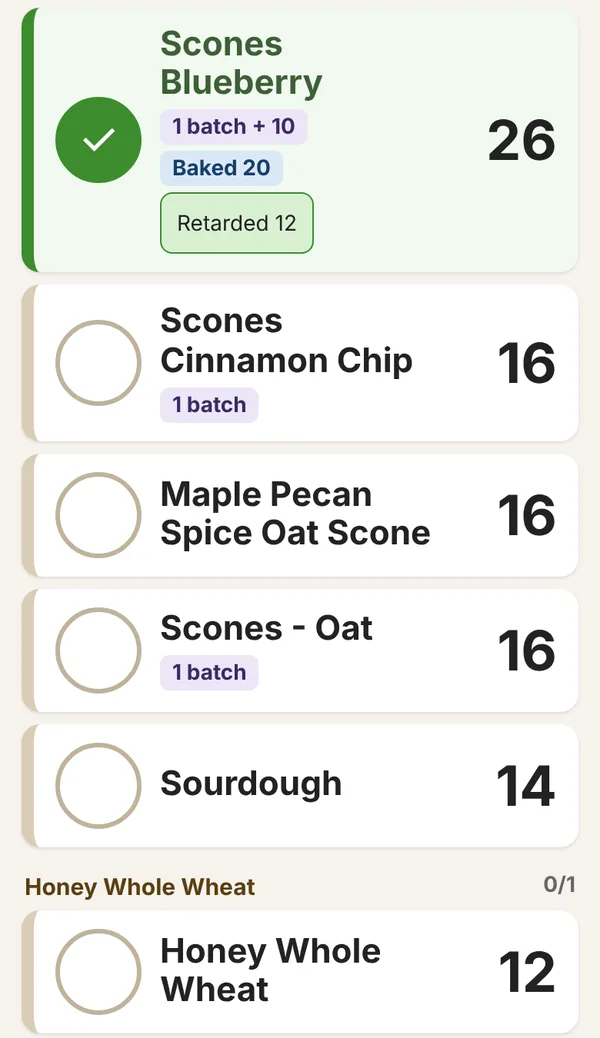
The Bake screen on a phone: Scones Blueberry ticked done, 1 batch plus 10, baked 20 and 12 retarded, then the next products with their batches and amounts
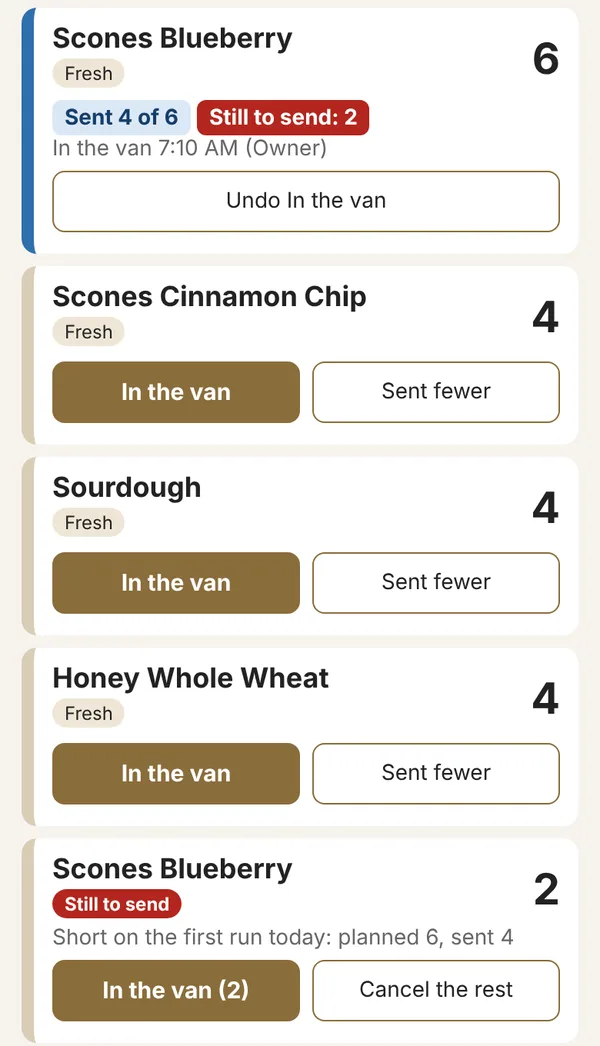
The van list to the second store: Scones Blueberry sent 4 of 6, still to send 2

The real app, shown with sample data.

Sound familiar?

Running a bakery is a hundred small handovers.

Most of them happen on paper, in a spreadsheet only you understand, or in your head. That works until you are off for a day. Here is what changes.

The plan is in my head.

par levels, leftovers and orders all have to be added up each night, by you, for every product.

With The Bakery DeskThe app adds it all up and suggests every product for every store. You adjust and confirm.

The bakers found out at 3 a.m.

An order lands after you planned the day and nobody tells the oven until it is too late.

With The Bakery DeskLate orders show on the bakers' screen with exactly what changed, and an updated bake list goes out.

Orders come from everywhere.

ezCater, your Wix website, the phone and email, each in its own place, so something always slips.

With The Bakery DeskEvery order lands in one list and goes straight onto the plan.

Closing depends on who is on.

Some nights everything gets done. Other nights you find out the next morning what did not.

With The Bakery DeskEach closer gets their own checklist, and you get a close report every night.

We should do more catering.

Everyone agrees, and nobody has time to find the offices and schools nearby or follow up.

With The Bakery DeskA short weekly plan of local stops and sample boxes, plus follow-up emails you approve.

I can't step away.

Because the system is you. Every question comes back to the owner's phone.

With The Bakery DeskEach role sees its own screen, so the answers are in the app, not on your phone.

Easy for every role

Most jobs are a single tap.

Big buttons, plain words, no typing at 3 a.m. Try them: each one is a real button from the app.

Owner, 6 PM

The bake list is emailed to the bakery, and any later change is flagged for the bakers.

Baker, 3 AM

The tray is ticked off on every screen and what was baked is recorded. No counting later.

Van, 7 AM

The other store sees it coming, ticks it Received, and both stores' counts follow.

Counter, all day

The order is set aside and marked ready, so nothing is missed at pickup.

Driver, 11 AM

The visit is logged and a follow-up email is drafted for the owner to approve.

Closer, 6 PM

When the last closer finishes, the owner gets the close report with anything skipped and why.

A day with The Bakery Desk

Everyone sees what they need, when they need it.

The app does the adding up and the passing on. Your team taps through their part of the day, and you get told what happened.

  1. You confirm tomorrow's plan

    The app suggests each product per store: par, minus what was left last night, plus every order due. Change any number with one tap, confirm, and the bake list is emailed to the bakery.

  2. The final list goes out

    If anything changed overnight, a fresh bake list arrives before the bakers do, with the changes listed at the top.

  3. Bakers bake from the tablet

    Today's list in bake order, in batches, with early catering items flagged. Tap Done as each tray goes in. After the oven, the screen shows what goes to each store and which orders to set aside.

  4. Orders land in one list

    ezCater, Wix website, phone, email and walk-in orders all arrive in the same place. A late order updates the bake list, and the bakers see exactly what changed and confirm it.

  5. This week's catering plan

    A one-page pack of local offices and schools to visit, call or drop a sample box to, printed for the back office and emailed to you.

  6. Every store closes the same way

    Each closer gets their own checklist with a progress bar that never leaves the screen. Counts take seconds, anything skipped needs a reason, and you get a close report when the last box is ticked.

See it in the app

Real screens, written in bakery language.

Batches, retarded dough, Baker's choice, the van run and the pack table. The app speaks the way your bakers already talk.

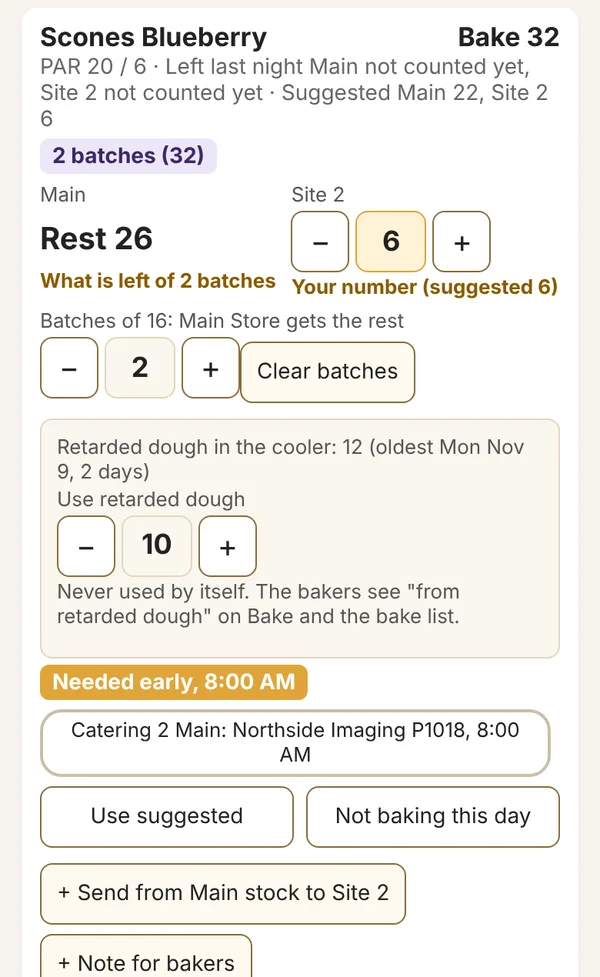
Plan for one product: 2 batches of 16, the second store keeps 6, the main store gets the rest, with retarded dough in the cooler and 10 used
Plan in batchesType the batches and the main store takes the rest. Use retarded dough from the cooler when you choose to, never by itself.
Bake screen with each product, its batches and amount, and a done tick
Bake from the tabletTap Done as each tray goes in. Record what you baked and what you retarded for another day.
Van list: each product ticked In the van, Sent fewer, and a Still to send line
The van, ticked at both endsSent fewer than planned? The rest stays on the list as Still to send until it goes on a later run.
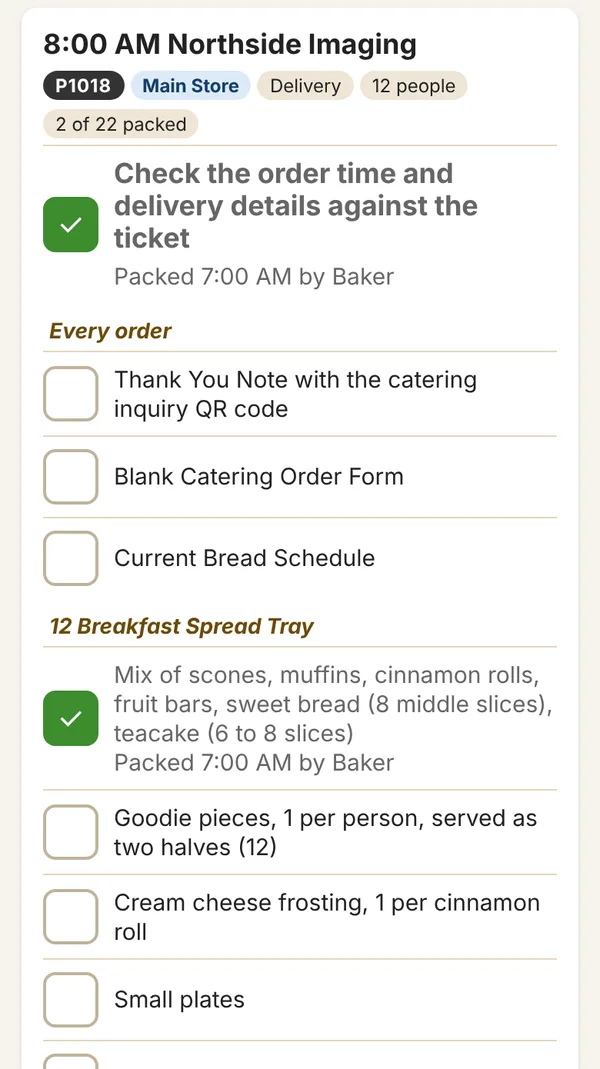
Catering pack list for a delivery: the check step, the kit every order gets, then each item's list scaled to the headcount
Catering pack listsEvery catering order gets its own checklist, scaled to the headcount, with each customer's exceptions built in.

Built for the whole team

One app, a simple screen for each job.

Staff sign in with a PIN, pick their store, and see only their part. Nobody needs training on a spreadsheet.

Owners and managers

Plan in minutes, not an hour

  • Suggested bake per store from par levels, leftovers and orders
  • Batch alerts that round up to full trays, never down
  • Your specials calendar feeds the plan, Baker's choice flavors included
  • One-off tasks for the day or the close, with who did them and when
  • A "still to set up" list, so nothing is forgotten after launch
  • Every store's close status at a glance

Bakers

Know exactly what to make

  • Bake order, batches and early items, on one screen
  • Retarded dough tracked, with a warning when it is getting old
  • Baker's choice flavor and shapes like "3 round" right on the line
  • Half-size orders counted correctly in the batch
  • Changes flagged with the order that caused them
  • Printed list for the bench, two pages, same layout

Closers

Close right, every night

  • Checklists by role or by time block, only today's items
  • Big tick targets and an always-visible progress bar
  • Skip with a reason, so 100% is always reachable
  • Leftovers counted with steppers, not a keyboard

Front counter and phones

Take any order in seconds

  • Find the customer by phone number
  • Standing weekly orders, with skip-a-date
  • Bread options like sliced or round as buttons
  • Copy any order to another day in two taps
  • Pull and mark ready, so nothing is missed at pickup

Getting told

The right people hear about it, without anyone chasing.

Bake list by emailWhen you confirm, and again before 3 a.m. if anything changed.
Updates within 15 minutesA late order or change after you confirmed? One bundled update, listing what moved.
Close reportWho closed, when, what was counted and anything skipped with its reason.
Monday catering packThis week's stops and calls, ready to print before the week starts.
Help on every screenStaff report a problem in a few taps, with the screen already filled in.

One store or several

Made for a single bakery. Ready when you add the next one.

One store

  • The full plan, bake, close and orders loop
  • Catering prospects around your store
  • Everything on one tablet in the back and the phones your team already has

Two or more

  • One plan with a column for each store
  • Bake centrally and send to each store, with van lists ticked as loaded and received
  • Short on a run? The rest is tracked until it goes
  • The other store can ask the bakery for more, and gets a yes or no with a reason
  • Send leftovers from one store to another as favorites, without baking more
  • Separate closing lists per store, one view for you
  • Orders tagged to the store that fulfils them

Grow catering

More direct catering, without cold calling.

Catering marketplaces are useful, but every direct order keeps the whole margin. The Bakery Desk gives your team a short, local plan each week and handles the follow-up.

  1. Local prospect listOffices, schools and clinics near each store, with phone numbers and drive times. You approve who goes on it.
  2. A weekly plan sized to your teamA few visits, calls and sample box drop-offs each week, printed every Monday.
  3. Inquiries land in your to-do listEach catering inquiry from your website form shows up for you to quote, with every answer the customer gave.
  4. Follow-up emails you approveShort, friendly emails from your own address, with photos of your own bakes. You edit the wording in the app, and nothing goes out until you say yes.
  5. Your existing customers, looked afterThank-yous after an order and a gentle note to customers you have not seen in a while, including your online ordering customers who opted in.
  6. Packed right, every timeA pack list for each catering order on its delivery day, ticked off at the prep table.
  7. Results you can seeWho was visited, who replied and which orders came from it.

Fits around you

Works with what you already have.

Your phones and tabletsRuns in the browser. Nothing to install, no app store, no new hardware.
ezCaterOrders arrive automatically where your ezCater account allows the connection.
Your website ordersWix online orders today, other platforms on request.
Phone, email and walk-insEntered by your team in a few taps.
Your data stays yoursEverything lives in your own Google account. You keep it whatever happens.
Alongside your POSKeep your till as it is. The Bakery Desk handles what happens before and after the sale.

Getting started

We set it up with you. Live in about two weeks.

Week 1Week 2First 30 days live
Walkthrough call20 minutes on how your bakery runs
We load your bakeryProducts, par levels, batches, customers, past orders
We connect your ordersezCater, your Wix website, the inquiry form and QR codes
You check and approveA few hours of your time, spread over the two weeks
TrainingTwo sessions, wall cards for each role, team guides
Go liveYour bakers bake from the app
Close supportWe watch every day with you for the first 30 days
We do itYou check itSupport included

Based on our first bakery, which went from first call to bakers using it in about two weeks. Close support for the first 30 days is included.

Pricing

One product, everything included. Priced per store.

No tiers to compare. Every bakery gets the full Bakery Desk, setup done for you, and support from a real person.

Setup, once

$2,495first store

Each additional store $750.

  • Walkthrough and setup plan
  • Products, par levels, batches, customers and order history loaded
  • ezCater and Wix website orders connected
  • Enquiry form, QR codes and email wording set up and approved by you
  • Two training sessions, wall cards and team guides
  • 30 days of close support after go-live

Example: two stores = $3,245 setup, then $598 a month.

Custom features and extra training days are quoted separately. Prices in US dollars.

Questions

What owners ask us first.

Do I need new hardware?

No. The Bakery Desk runs in the browser on the phones and tablets you have. Most bakeries keep one tablet open in the bakery and one at each counter.

Who owns my data?

You do. Your products, orders and counts live in your own Google account. We have access to run and support the app, and you can remove that access whenever you want.

Does it replace my POS or ezCater?

No. Keep your till and keep ezCater. The Bakery Desk brings their orders into one plan and takes care of the bake, the close and the catering follow-up around them.

How much of my time does it take?

Setup needs a few hours from you across two weeks, mostly checking what we have loaded. After that, planning a day takes minutes, and the catering plan asks for a few hours a week from your team.

What if something goes wrong?

Every screen has a Help button. Staff report a problem in a few taps, and we reply within 2 business days. Anything stopping an order today is flagged to us straight away.

I run one store. Is it worth it?

Yes. The plan, bake and close tools are built for a single bakery first. More stores simply add a column to the plan and a list to the close.

Can I cancel?

Yes. The monthly fee runs month to month with 30 days' notice, and your data stays in your Google account.

Book a walkthrough

See it running on a real bake list.

Tell us a little about your bakery and we will set up a 20 minute call at a time that suits you. We reply within one business day.

hello@thebakerydesk.com
Where do your orders come from today?

We use these details only to reply to you. See our privacy notice.